10 tajni koje nikada ne treba slati u chat
I šta koristiti umesto toga
Od Slacka i Microsoft Teamsa do WhatsAppa i Messengera, čet je postao podrazumevani način razmene informacija. Brz je, praktičan i drži timove usklađenima. Nažalost, postao je i digitalno groblje visoko osetljivih podataka — podeljenih u trenutku praktičnosti, zatim zaboravljenih.
Ključni zaključci
- Čet aplikacije su napravljene da zadrže kontekst—ne da zaborave kredencijale.
- Lozinke, API ključevi, seed fraze i kodovi za oporavak ne pripadaju četu.
- Koristite jednokratne šifrovane linkove za predaju tajni između ljudi.
- Rotirajte sve što je već nalepljeno u trajni niz poruka.
Mnoge moderne čet aplikacije nude snažno šifrovanje u prenosu ili čak end-to-end šifrovanje. Šifrovanje štiti poruke dok putuju između uređaja. Veći problem je šta se dešava posle. Kada tajna uđe u čet, često ostaje pretraživa mesecima ili godinama u više sistema.
Ta trajnost stvara iznenađujuće veliki digitalni otisak. Osetljive informacije mogu preživeti u pretraživoj istoriji četa, cloud rezervnim kopijama, izvozima radnog prostora, pregledima obaveštenja, snimcima ekrana i sinhronizovanim uređajima.
Prema Verizonovom izveštaju o istraživanju povreda podataka za 2026., 62% povreda uključuje ljudski element — krađu kredencijala, phishing, socijalni inženjering, zloupotrebu i jednostavne greške. Tehnologija sama ne može sprečiti te incidente ako se osetljive informacije dele nepažljivo.
Sigurniji pristup oslanja se na jednostavno načelo: delite informacije samo kada treba i obezbedite da nestanu nakon prvog pregleda. To je model iza jednokratnih tajnih linkova — i zašto PrivateNote tretira vek trajanja beleške kao deo bezbednosti, ne naknadnu misao.
Brza referentna bezbednosna tabela
Nikad ne šaljite
Lozinke
Rizik
Indeksirane u trajnoj istoriji četa i pretraživim logovima.
Bolji pristup
Nikad ne šaljite
Kodovi za oporavak
Rizik
U praksi trajno zaobilazi višefaktorsku autentifikaciju.
Bolji pristup
Namenski menadžer lozinki ili jednokratna beleška.
Nikad ne šaljite
API ključevi
Rizik
Slučajno lepljenje u javni kanal kompromituje produkciona okruženja.
Bolji pristup
Samouništavajuća sigurna beleška sa enkripcijom na strani klijenta.
Nikad ne šaljite
Dokumenti
Rizik
Ostavlja trajne kopije razbacane po lokalnim folderima preuzimanja.
Bolji pristup
Privremeni enkriptovani prenos fajlova sa ograničenim pristupom.
Zašto čet nije menadžer tajni
Platforme za poruke dizajnirane su za komunikaciju, ne za upravljanje tajnama. Njihova svrha je očuvati razgovore između uređaja, sinhronizovati istoriju, podržati pretragu, stvarati rezervne kopije i voditi zapise saradnje.
Te iste funkcije postaju odgovornost kada se dele kredencijali ili korporativna imovina. Informacije ostaju dostupne dugo nakon što su ispunile svrhu. Naš članak o poslovnim porukama i pravnom otkrivanju pokazuje kako neformalno napisane poruke mogu nadživeti izvorni kontekst godinama.
Jednokratna tajna prati drugačiji model: učinite informaciju dostupnom samo kratko dok je stvarno potrebna — zatim uklonite pristup na strani servera po dizajnu.
Vek trajanja podataka: klasični čet naspram PrivateNote-a
Razlika nije u tome da li je poruka šifrovana u prenosu. Reč je o tome da li tajna i dalje postoji negde nakon što je pročitana.
Compare data lifetime
Tok klasičnog četa
Data accumulates at every step
- Lozinka
- Slack / Teams
- Sačuvano
- Pretraživo
- Rezervne kopije
- Godinama kasnije
PrivateNote tok
Encrypted once, removed after read
- Lozinka
- Enkripcija u pregledniku
- Jednokratni link
- Pregledano
- Obrisano sa servera
10 tajni koje treba zabraniti u čet aplikacijama
1. Lozinke naloga
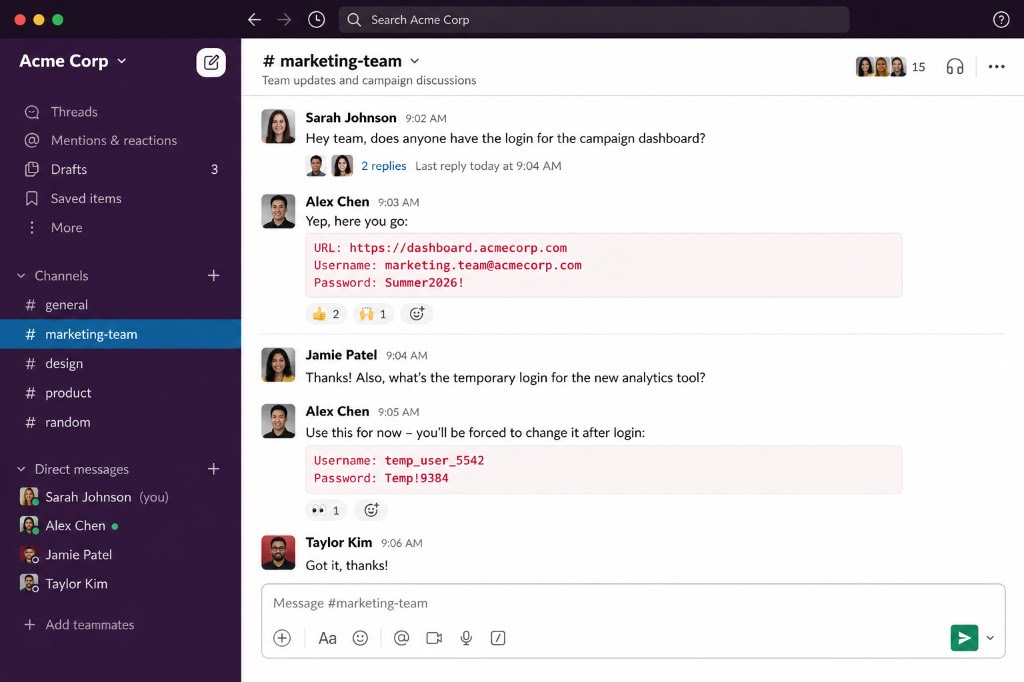
Svi smo to videli: "Hej, koja je opet lozinka za zajednički marketing nalog?" praćeno odgovorom u običnom tekstu. Čak i ako u potpunosti verujete kolegi, ta lozinka je sada indeksirana u istoriji radnog prostora, u kešu lokalnih podataka aplikacije i možda vidljiva u pregledima e-pošte ili push obaveštenja.
Ako napadač kompromituje tu istoriju četa mesecima kasnije, nasleđuje aktivan pristup vašem nalogu.
Instead — Pošaljite jednokratni link enkriptovan u pregledniku. Kada primalac otvori link i preuzme lozinku, šifrovani tekst se briše sa host servera. Trebate jaku lozinku pre toga? Koristite naš generator lozinki.
2. Kodovi za oporavak višefaktorske autentifikacije (MFA)
Pri uključivanju MFA servisi generišu rezervne kodove za hitne slučajeve. Pošto se korisnici boje gubitka pristupa, često ih nalepe u čet sa kolegom — ili pošalju u sopstveni lični čet.
Kodovi za oporavak rezervni su glavni ključevi. Tretirati ih kao ležernu poruku poništava celu svrhu višefaktorske bezbednosti.
Instead — Čuvajte ih u namenskom menadžeru lozinki. Ako ih morate podeliti tokom predaje naloga, koristite privremenu belešku za jedan pregled kako tajna ne bi trajno ostala u istoriji četa.
3. Produkcijski API ključevi
Developeri rutinski razmenjuju API ključeve, pristupne tokene ili cloud tajne preko četa da brzo reše problem. GitHub Secret Scanning kontinuirano otkriva izložene kredencijale u javnim repozitorijumima — dokaz koliko često tajne cure slučajno.
Jedno slučajno lepljenje u pogrešan kanal može izložiti live baze podataka ili billing pipeline.
Instead — Usmerite tokene kroz enkriptovanu belešku na strani klijenta koja automatski ističe nakon jednog pregleda.
4. SSH privatni ključevi
Vaš privatni ključ vaš je identitet za serversku infrastrukturu. Nikad ne bi trebao postojati u messaging aplikaciji. Kopiranje privatnog ključa znači da kopija sada živi van namenjenog sigurnog okruženja — i može preživeti u istoriji četa, rezervnim kopijama ili na uređajima primaoca.
Instead — Ako se ključ mora sigurno premestiti, koristite enkriptovani payload za jedan pregled koji se briše sa host servera nakon isporuke.
5. Pozivnice i linkovi za reset
Ljudi stalno bacaju privremene onboarding i administrativne linkove u čet kanale:
- Zoom linkovi za dodelu hosta
- Google Meet tokeni moderatorskog pristupa
- Stripe onboarding pozivnice
- Pozivnice za admin privilegije
- URL-ovi za reset lozinke
Instead — Isporučite linkove visokih privilegija putem jednokratne beleške kako se ne bi mogli pokupiti iz istorijskih logova ako ostanu neiskorišćeni.
6. Seed fraze za kriptovalute
Vaša 12- ili 24-rečna fraza oporavka kontroliše ceo novčanik. Ako neko kompromituje vaš čet nalog godinama kasnije, automatizovano skeniranje može pretražiti istorijske razgovore za fraze u seed formatu. Ako vam ukradu seed frazu, imovina može biti trajno izgubljena.
Instead — U potpunosti izbegavajte digitalni prenos seed fraza. Ako apsolutna nužda prisili na to, koristite enkriptovanu belešku koja nakon čitanja odmah briše sadržaj kako biste ograničili izloženost.
7. Privremeni pristupni kredencijali
IT helpdeski često dele početne kredencijale tokom onboardinga zaposlenih. Iako se korisnika obično traži promena lozinke pri prvoj prijavi, privremeni kredencijal ostaje pretraživ u istoriji četa. Ako korisnik odloži promenu — ili sistem dozvoljava ponovnu upotrebu lozinke — ta poruka ostaje aktivna ranjivost.
Instead — Isporučite privremene kredencijale kroz belešku enkriptovanu u pregledniku koja ističe nakon pregleda.
8. Finansijske i bankovne informacije
Lepljenje korporativnih IBAN-ova, podataka za wire transfer, poreskih dokumenata ili potvrda plaćanja u čet deluje bezazleno jer IBAN sam po sebi nije lozinka. Međutim, kada napadači spoje bankovne podatke sa ličnim razgovorima u istoriji četa, dobijaju kontekst potreban za uverljive phishing i invoice-fraud napade.
Instead — Odvojite finansijske podatke od svakodnevnog razgovora. Delite ih kroz enkriptovane kanale koji uklanjaju pristup čim je transakcija potvrđena.
9. Skenovi ličnih dokumenata
Trebate brzo poslati kopiju pasoša, vozačke dozvole ili ugovora o radu HR-u? Bacanje PDF-a u čet prozor kopira visoko osetljive identitetske podatke u cloud rezervne kopije, lokalne galerije telefona i sinhronizovane desktop foldere.
Instead — Koristite siguran prenos fajlova sa enkripcijom u pregledniku — jedno preuzimanje, zatim fajl se briše sa hosting servera prema vašim podešavanjima pristupa.
10. Poverljive poslovne informacije
Interni strateški deckovi, neobjavljene cenovne ponude, pravni nacrti i dokumenti o akvizicijama stalno kruže timskim kanalima. Curenja podataka ne dolaze uvek od spoljnih hakera; ponekad se dese jer zaposleni slučajno pozove spoljnog gosta u kanal sa godinama interne strategije.
Instead — Delite osetljivu korporativnu imovinu enkriptovanim beleškama sa strogim automatskim datumima isteka i ograničenim prozorima pristupa.
Tajne imaju vek trajanja
Šifrovanje štiti tajne u prenosu. Istek ih štiti kroz vreme. Većina čet aplikacija taj drugi deo u potpunosti ignoriše.
Kada koristite PrivateNote, bezbednosni stav menjate po dizajnu. Umesto oslanjanja na korisnike da kasnije obrišu osetljive poruke, nametnete vek trajanja tajne. Primalac pročita jednom — i tada nestaje sa servera.
- Bez trajnog otiska: nijedna istorija četa ili pretraživa arhiva ne sadrži sirovu tajnu.
- Smanjenje blast radiusa: ako se laptop ili čet nalog kasnije kompromituje, nema starih lozinki u logovima za berbu.
- Ublažavanje ljudske greške: sistem automatski minimizira podatke, bez potrebe da ručno brišete osetljive poruke.
Bezbednost ispod haube: kako PrivateNote radi
PrivateNote enkriptuje vašu poruku direktno u pregledniku pre uploada. Server čuva samo enkriptovani šifrovani tekst. Ključ za dešifrovanje živi u URL fragmentu — delu nakon `#` — koji preglednici ne šalju web serverima kao deo HTTP zahteva. Server nikad ne prima ključ za dešifrovanje.
Kada se beleška otvori prema vašim podešavanjima, enkriptovani šifrovani tekst briše se sa servera. Za lozinke, API ključeve, kodove za oporavak i privremene kredencijale, ograničavanje veka trajanja podataka jednako je važno kao i enkripcija samih podataka. Četovi čuvaju razgovore. PrivateNote ograničava vek trajanja tajni.
Često postavljana pitanja
Da li je slanje lozinki u Slacku sigurno?
Slack šifruje podatke u prenosu i u mirovanju, ali lozinke ostaju u pretraživoj istoriji četa dok se ne obrišu. Za privremene kredencijale, jednokratna beleška enkriptovana u pregledniku smanjuje dugoročnu izloženost.
Da li su WhatsApp poruke sigurne za lozinke?
End-to-end šifrovanje štiti poruke tokom prenosa, a nestajuće poruke mogu ih automatski obrisati nakon zadatog vremena — ali primaoci i dalje mogu snimiti ekran, proslediti ili rezervno kopirati sadržaj pre nego što nestane. Lozinke bi se idealno trebale deliti samo dok su potrebne — kroz jednokratnu tajnu vezu, ne trajni čet thread.
Da li je e-pošta sigurnija od četa za lozinke?
Ne. Standardna e-pošta po defaultu nema end-to-end šifrovanje i prolazi kroz više mail servera. Kada je isporučena, lozinka beskonačno stoji u sandučićima, poslatim folderima, lokalnim keševima i rezervnim kopijama provajdera.
Šta je jednokratna tajna?
Jednokratna tajna poruka je ona koja postaje nedostupna nakon jednog pregleda ili nakon definisanog vremena isteka — smanjujući trajne kopije u sistemima. Pogledajte naš vodič o tome kako jednokratni tajni linkovi rade.
Reference
- Verizon. 2026 Data Breach Investigations Report (DBIR). verizon.com/business/resources/reports/dbir/
- Verizon. 2026 Healthcare Data Breach Investigations Snapshot. verizon.com/business/resources/reports/2026-dbir-healthcare-snapshot.pdf
Delite tajne bez otiska u obliku četa
Čet je odličan za koordinaciju. Loš je trezor za kredencijale, ključeve, kodove za oporavak i dokumente koji nikad nisu trebali trajati.
PrivateNote je izgrađen za suprotan obrazac: enkripcija u pregledniku, deljenje linka i istek tajne kada posao završi — pošiljaocu nije potreban nalog, nema običnog teksta u pretraživoj arhivi godinama.
Manje istorije četa. Manje metapodataka. Više kontrole nad tim koliko dugo tajna postoji online.

