Por que o e-mail é o pior lugar para enviar segredos
O e-mail foi feito para entregar mensagens — não para fazê-las desaparecer. Senhas, chaves de API e códigos de recuperação enviados por e-mail costumam ficar para sempre em caixas de entrada pesquisáveis.
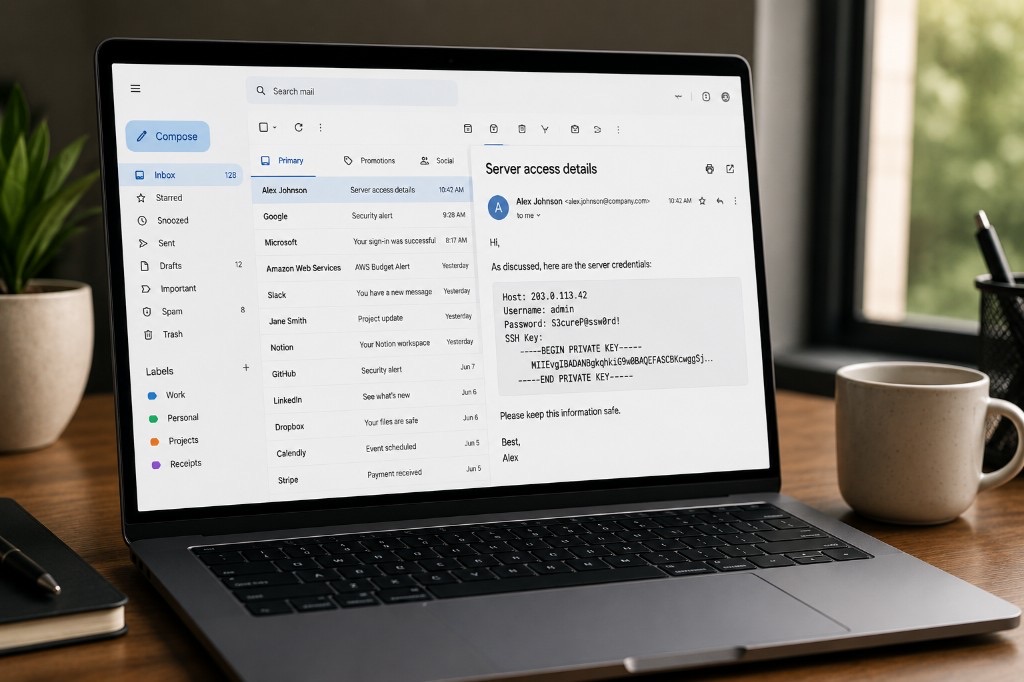
Principais conclusões
- O e-mail cria cópias duráveis em caixas de entrada, backups e dispositivos.
- Encaminhamento, busca e sincronização mantêm segredos descobertos por anos.
- Use links de uso único criptografados no navegador para credenciais e códigos de recuperação.
- Mantenha o canal de transporte separado do armazenamento de longo prazo.
O e-mail se tornou a forma padrão de trocar quase tudo — contratos, senhas, chaves de API, dados bancários, prontuários médicos, documentos de identidade, senhas de Wi‑Fi e códigos de recuperação. A maioria de nós envia informações sensíveis por e-mail sem pensar duas vezes.
O e-mail foi feito para entregar mensagens — não para fazê-las desaparecer
Depois que você envia um e-mail, frequentemente perde o controle sobre onde ele termina, por quanto tempo é armazenado e quem pode eventualmente ter acesso a ele. Se você está enviando algo que deve permanecer privado, o e-mail geralmente é a ferramenta errada.
Seu e-mail não existe em apenas um lugar
Muitas pessoas imaginam o e-mail como uma conversa simples entre duas pessoas. Na realidade, cada e-mail normalmente existe em múltiplos locais:
- sua caixa de entrada
- a caixa de entrada do destinatário
- backups do provedor de e-mail
- cópias arquivadas
- dispositivos sincronizados
- sistemas de backup da empresa
- arquivos PST ou MBOX exportados
- infraestrutura de recuperação de desastres
Mesmo que você exclua um e-mail, cópias podem continuar existindo em outros lugares. Algumas organizações retêm e-mails por anos para atender requisitos legais, regulatórios ou empresariais. Na prática, um e-mail frequentemente se torna permanente.
Segredos envelhecem mal
O aspecto mais perigoso do e-mail não é necessariamente hoje. É daqui a cinco anos. Imagine que você enviou por e-mail para alguém:
- uma senha de banco de dados de produção
- uma chave de API
- credenciais SSH
- dados de login de VPN
- uma frase de recuperação de criptomoeda
Talvez as credenciais tenham mudado desde então. Talvez não. Anos depois, esse e-mail ainda pode estar em múltiplas caixas de entrada, pesquisável em segundos. Qualquer pessoa que ganhe acesso a uma dessas contas de repente tem um mapa dos seus segredos passados. Nosso guia sobre segredos que você nunca deve enviar no chat cobre riscos semelhantes em apps de mensagens — o e-mail costuma ser pior porque a retenção é mais longa e as cópias são mais numerosas.
O e-mail foi feito para ser pesquisável
Modern email clients are incredibly good at finding old messages. Search for password, API, or confidential, and messages from years ago appear almost instantly.
Isso é um recurso fantástico para comunicação do dia a dia. É terrível para segredos. Informações sensíveis deveriam se tornar mais difíceis de encontrar com o tempo — não mais fáceis.
Encaminhar leva um clique
Talvez você confie no destinatário. Isso nem sempre é suficiente. E-mails são rotineiramente:
- encaminhado
- copiado para sistemas de tickets
- colado em apps de chat
- anexado a outros e-mails
- compartilhado com terceirizados
- incluído em solicitações de suporte
Uma vez que um segredo sai da sua caixa de entrada, você não controla mais quantas cópias existem. Diferente de um gerenciador de senhas ou serviço de compartilhamento criptografado, o e-mail não tem conceito de revogar acesso após a entrega.
A IA está processando e-mail cada vez mais
Outro motivo para pensar com cuidado antes de enviar informações sensíveis por e-mail é que os provedores de e-mail estão usando cada vez mais sistemas automatizados para processar mensagens. Esses sistemas podem ajudar com:
- detecção de spam
- proteção contra phishing
- detecção de malware
- respostas inteligentes
- categorização da caixa de entrada
- busca
- recursos de produtividade
- escrita e resumo assistidos por IA
Os provedores diferem significativamente em como esses recursos funcionam, quais dados são processados e sob quais políticas de privacidade. Embora muitos provedores tenham introduzido compromissos de privacidade mais fortes nos últimos anos, enviar informações sensíveis por e-mail ainda significa confiar essas informações a sistemas fora do seu controle. Se seu objetivo é minimizar a exposição, reduzir a quantidade de informações sensíveis enviadas por e-mail é um primeiro passo sensato.
A varredura regulatória também faz parte do debate
A privacidade não é mais apenas uma questão técnica. Tornou-se uma questão de política. Em julho de 2026, o Parlamento Europeu aprovou uma prorrogação do quadro jurídico temporário que permite que provedores de certos serviços de comunicação detectem e denunciem voluntariamente material de abuso sexual infantil (CSAM) até abril de 2028.
O quadro afeta principalmente serviços que podem acessar o conteúdo das mensagens, como muitos provedores de e-mail tradicionais e outros serviços de comunicação sem criptografia de ponta a ponta. Para mais sobre o que essa votação significou — e por que mais votos “Não” do que “Sim” ainda resultou em aprovação — veja nossa explicação sobre o Chat Control 1.0.
O objetivo declarado é proteção infantil, e pessoas sensatas podem discordar sobre o equilíbrio adequado entre privacidade e segurança pública. Ainda assim, a discussão ilustra um ponto importante: se um serviço pode ler suas mensagens, então leis, políticas ou decisões de plataforma futuras podem afetar como essas mensagens são processadas. Por outro lado, serviços criptografados de ponta a ponta são fundamentalmente diferentes porque o provedor não possui as chaves criptográficas necessárias para ler o conteúdo.
Há uma maneira melhor de compartilhar segredos
Nem toda informação precisa existir para sempre. Às vezes você simplesmente precisa enviar algo uma vez. Exemplos:
- uma senha
- uma chave de API
- um código de recuperação
- uma licença de software
- uma credencial de servidor
- uma mensagem confidencial
Em vez de enviar isso diretamente em um e-mail, envie um link criptografado de uso único. O destinatário abre o link, lê o segredo e os dados criptografados são permanentemente excluídos. Para chaves de API especificamente, veja nosso guia de fluxo de trabalho sobre como compartilhar uma chave de API com segurança.
- Sem histórico na caixa de entrada.
- Sem arquivo pesquisável.
- Sem encaminhamento acidental do próprio segredo.
- Sem cópias esquecidas paradas em caixas de entrada por anos.
A ferramenta certa para a informação certa
O e-mail continua sendo uma das tecnologias de comunicação mais úteis já criadas. É excelente para conversas, faturas, newsletters e comunicação empresarial do dia a dia.
Não é o lugar ideal para informações que deveriam desaparecer depois de cumprir seu propósito. Senhas, códigos de recuperação, chaves de API, documentos confidenciais e outras informações sensíveis merecem um mecanismo de compartilhamento projetado com privacidade em mente.
Às vezes o segredo mais seguro é aquele que simplesmente não existe mais.
Compartilhe um segredo sem deixá-lo na caixa de entrada de alguém
Crie uma nota criptografada de uso único no seu navegador. Envie o link por e-mail se precisar — o segredo em si fica fora da thread.
Experimente a PrivateNote ->
