VS Code, Cursor & Codex IDE
The primary developer entry point — compose, configure, and share without switching context.
Who this is for
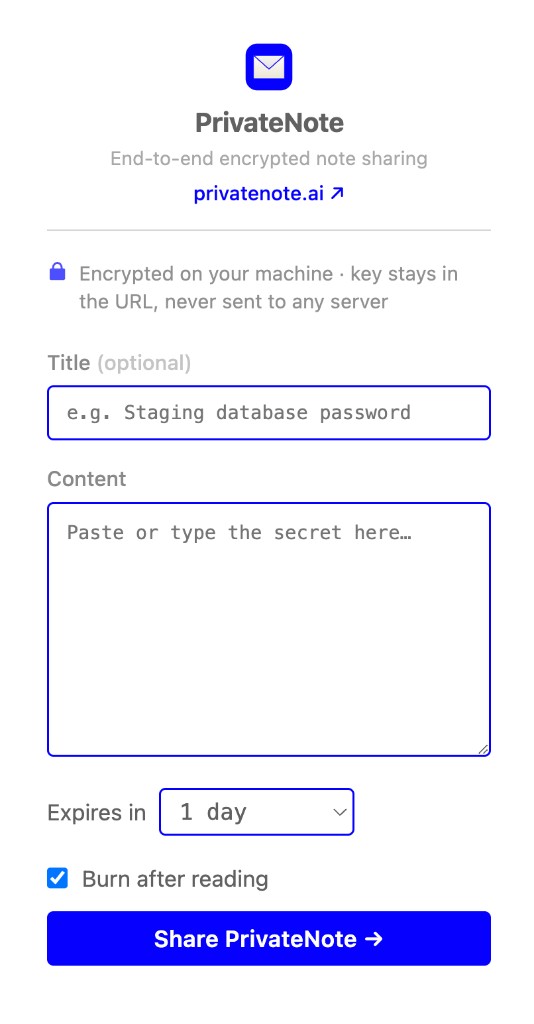
If you spend your day in an editor, this is the lowest-friction path. Install once and create encrypted handoff links from the sidebar, a context menu, or the editor title bar.
Select any text and right-click Share as PrivateNote for quick one-off transfers. The extension encrypts locally and copies the link to your clipboard.
Install
# VS Code / Cursor Extensions panel (Cmd+Shift+X / Ctrl+Shift+X)
# Search: PrivateNote

# Or install from the terminal:
code --install-extension PrivateNote.privatenote-vscode
Security architecture
The extension uses the same client-side encryption as the web app: AES-256-GCM with a random 256-bit key that never leaves your machine.
Only ciphertext is uploaded. The decryption key is appended to the share URL as a fragment, outside HTTP requests.
Encrypt locally
AES-256-GCM on your device — browser, editor, terminal, or MCP process.
Upload ciphertext
Only encrypted bytes and note metadata (expiry, burn-after-reading) reach the server.
Key in #fragment
The decryption key stays in the URL hash. Browsers do not send fragments in HTTP requests.
privatenote.ai/note/…#key
Sidebar flow for deliberate notes with expiry and burn settings.
Selection and title-bar shortcuts for fast handoffs.
Link copied to clipboard after create — treat it like the secret itself.
Workflows and commands
| Name | Description |
|---|---|
| Sidebar panel | Compose content, set expiry, burn-after-reading, then share |
| Share as PrivateNote | Context menu on selected text |
| Title bar action | Lock icon when text is selected |
| privatenote.apiBaseUrl | API host for self-hosted instances (default: https://privatenote.ai) |
| privatenote.webOrigin | Share-link origin; usually matches apiBaseUrl |
| Default expiry | 15 minutes, 1 hour, 1 day, or 7 days |
| Burn after reading | Enabled by default; note self-destructs after first view |
Related integrations
CLI
Pipe secrets from stdin or files. Encrypt locally, print a one-time link, and keep plaintext out of shell history and build logs.
View docsMCP server
Give an MCP client a preview-and-confirm flow that encrypts a local file after you approve the exact bytes.
View docsCodex plugin
Install the bundled plugin for MCP plus skills, or add privatenote-mcp to ~/.codex/config.toml. Use the same VS Code extension in the Codex IDE for secrets the agent never sees.
View docsChrome extension
Encrypt selected text from any tab via context menu, toolbar popup, or keyboard shortcut — without opening the site first.
View docsVS Code, Cursor & Codex IDE
The primary developer entry point — compose, configure, and share without switching context.



